---
title: Prompting guide
description: "How to write the three prompt fields, Agent Identity, Tasks and Guardrails, so a single-prompt agent behaves the way you expect on every call."
---
Single-prompt agents
A single-prompt agent's behaviour is three fields on **Settings**: **Agent
Identity** (who it is), **Tasks** (what it does) and **Guardrails** (what it must
and must not do). The model reads all three on every turn. Write them as
instructions to a new colleague, not as a script.
:::tip[The shortest useful advice]
One role, a numbered list of tasks in the order they usually happen, and a short
list of hard rules. Then test in **Chat**, read what went wrong, and add one line.
:::
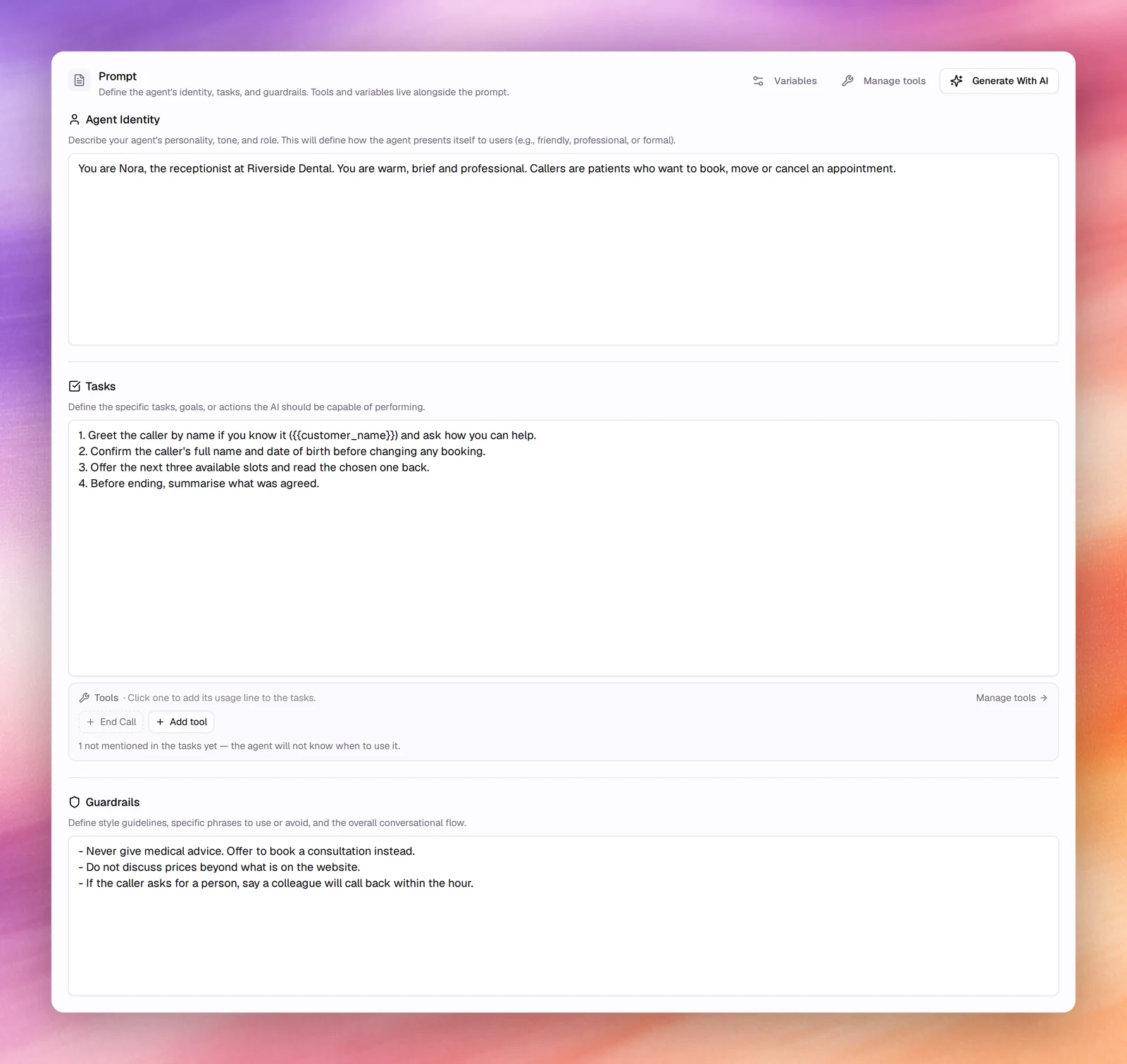
## Agent Identity
The app's own hint: describe the agent's personality, tone and role; this defines
how it presents itself. Cover four things in a few sentences:
- Its name and who it works for.
- Who it is talking to and why they called.
- Its tone, in two or three adjectives.
- The channel, because "you are on a phone call" changes how the model writes
(shorter sentences, no lists, numbers read as words).
```text
You are Nora, the receptionist at Riverside Dental. You are on a phone call with a
patient who wants to book, move or cancel an appointment. You are warm, brief and
professional.
```
## Tasks
The hint: the specific tasks, goals or actions the agent should perform. A numbered
list in the order they usually happen works best, one action per line, with the
information the agent must collect named explicitly.
```text
1. Greet the caller and ask how you can help.
2. Before changing any booking, confirm the caller's full name and date of birth.
3. Offer the next three available slots and read the chosen one back.
4. If the caller asks for a person, take a message and promise a call back within
the hour.
5. Before ending, summarise what was agreed.
```
Name tools where they belong: "use the transfer tool when the caller asks for
billing". A tool the prompt never mentions is used less reliably.
The **Tools** bar under **Tasks** helps with this. It shows each of the agent's
tools as a chip, marked once the tasks name it. Clicking an unmarked chip adds a
usage line to the end of the tasks, in the form
`- use "end_call" to ""`, which you can then rewrite in
your own words. While any tool is unmentioned, the bar says how many and warns
that the agent will not know when to use them. **Add tool** adds a tool and its
usage line in one go, and **Manage tools** opens the
[Tools section](/build/tools/overview).
## Guardrails
The hint: style guidelines, phrases to use or avoid, and the overall conversational
flow. Hard rules, each on its own line, most important first. Say what to do
instead of the forbidden thing; a bare "never" leaves the agent with no move.
```text
- Never give medical advice. Offer a consultation instead.
- Do not quote prices beyond what is on the website.
- Keep every reply under two sentences unless reading back a booking.
- If you do not know, say so and offer a call back.
```
More on this in [Guardrails](/build/prompting/guardrails).
## Habits that pay off
- **Plain language.** The model follows sentences; it does not need keywords or
formatting tricks.
- **Positive instructions.** "Ask for the postcode" beats "don't forget the
postcode".
- **Numbers, dates and names.** Tell a voice agent to read digits one at a time and
to confirm spellings of names; transcription is where most errors come from.
- **Dynamic variables.** Put per-caller facts in `{{placeholders}}`, not in the
prose. See [Dynamic variables](/build/dynamic-variables).
- **Short prompts test faster.** Every extra paragraph is something the model may
weigh against your real instruction. Start from **Generate With AI** and cut; select a
passage and choose **Shorten** to [edit it with AI](/build/prompting/generate-with-ai#edit-a-passage-with-ai).
- **One change at a time.** Save creates a version; **Versions** shows the diff, so
you can tell which line fixed or broke a behaviour.
## Text agents
The same three fields drive a text agent. Drop the phone-call framing from the
identity and allow lists and links in the guardrails; the reply is read, not heard.
## Related
- [Generate with AI](/build/prompting/generate-with-ai)
- [First message and conversation](/build/prompting/first-message-and-conversation)
- [Guardrails](/build/prompting/guardrails)
- [Testing in the browser](/test-and-improve/testing-in-the-browser)
- [Evaluations](/test-and-improve/evaluations)