---
title: Transfer Call
description: "Hands the caller to a person, a queue or another number over Twilio, a SIP trunk or Ziwo, with a blind, dial or attended method and custom SIP headers."
---
Voice agents
**Transfer Call** moves the caller to another department or phone number. The agent
says a line, the platform transfers the call, and the agent leaves it. The fields
depend on the **Transfer Type**, which must match how the call is connected: a
call on a SIP trunk number transfers over SIP, a call on a Twilio number over
Twilio.
:::tip[When to use it]
Any time a person should take over: the caller asks for someone, the request is
outside the agent's brief, or a guardrail says a human handles it. Put the trigger
in the tool's **Description** and repeat it in **Guardrails**.
:::
## Configuring it
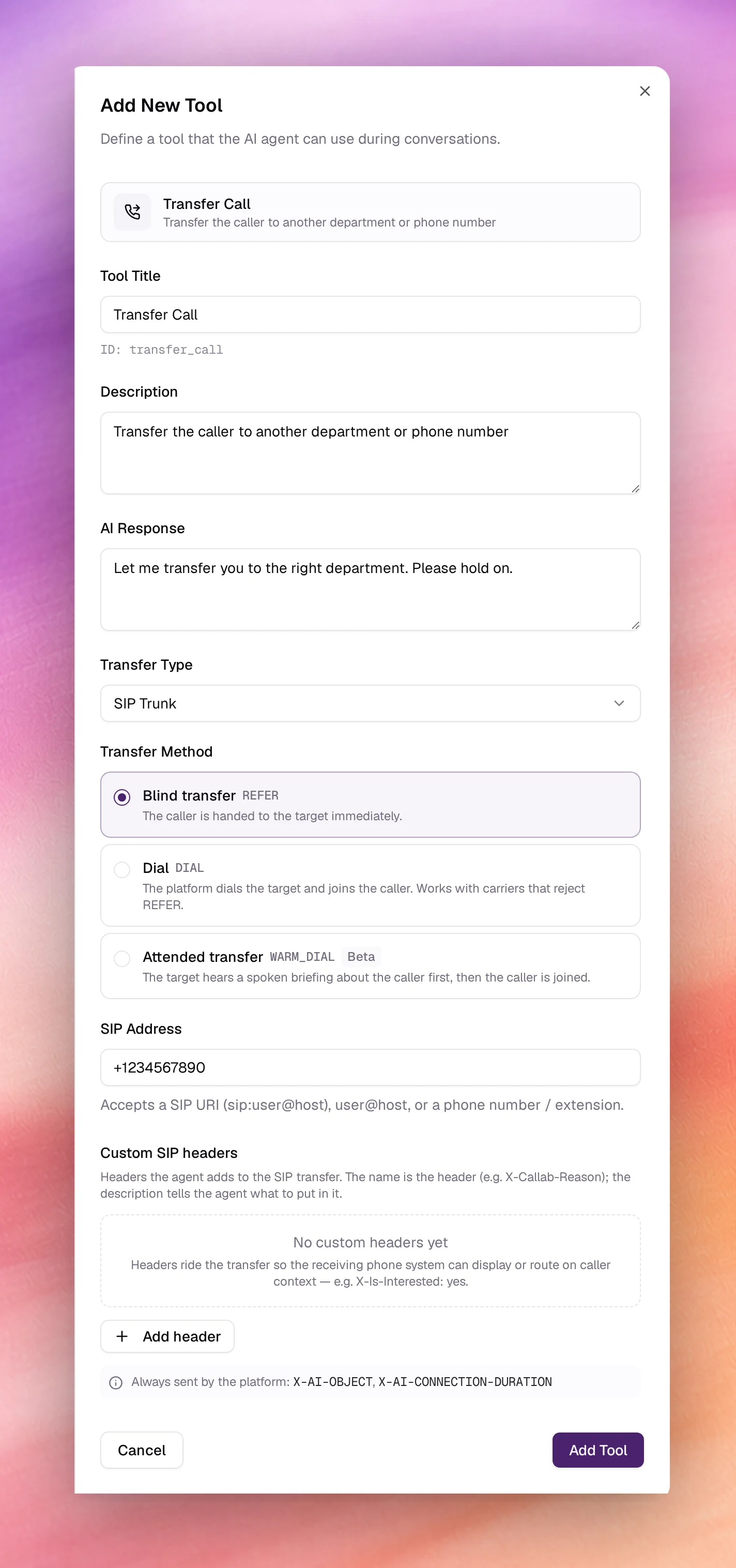
Open **Tools** under **Build**, choose **Add tool**, then **Transfer Call**. After
the [shared fields](/build/tools/overview#fields-every-tool-shares) come the
transfer fields.
| Field | Default | Notes |
|---|---|---|
| **Tool Title** | `Transfer Call` | Use one tool per destination: `Transfer to Sales`, `Transfer to Billing`. The ID under the field is derived from the title (`transfer_to_sales`) and must differ between tools. |
| **Description** | `Transfer the caller to another department or phone number` | Say which callers go here. |
| **AI Response** | `Let me transfer you to the right department. Please hold on.` | Said before the transfer starts. |
| **Transfer Type** | `Twilio` | **Twilio**, **SIP Trunk** or **Ziwo**. Decides the fields below. |
The destination is required whatever the type. A new tool starts with a sample
number in it; replace it with the real destination.
### Twilio
| Field | Type | Notes |
|---|---|---|
| **Phone Number** | Text | The destination in E.164 format, for example `+14155552671`, with at least 7 digits. For calls on a [BYOT Twilio](/deploy/phone-numbers/byot-twilio) number. |
### SIP Trunk
For calls on a [SIP trunk](/deploy/phone-numbers/sip-trunk) number. The form has 3
parts: where the call goes, the dial options, and the headers sent with it.
| Field | Type | Default | Notes |
|---|---|---|---|
| **Transfer Method** | Choice | **Blind transfer** | One of the 3 methods below. |
| **SIP Address** | Text | sample number | Required. A SIP URI (`sip:1000@pbx.example.com`, or `sips:`), `user@host` with an optional port, or a phone number or extension such as `+15555550100` or `2001`. Free text is rejected because it cannot be routed. |
The 3 transfer methods:
| Method | Value | What happens |
|---|---|---|
| **Blind transfer** | `REFER` | The caller is handed to the target immediately. |
| **Dial** | `DIAL` | The platform dials the target and joins the caller. Works with carriers that reject REFER. |
| **Attended transfer** (Beta) | `WARM_DIAL` | The target first hears a spoken briefing about the caller, then the caller is joined. |
With **Dial** or **Attended transfer**, a collapsed **Dial options** section sets the
outbound identity, authentication and target rewriting for the new call leg:
| Field | Type | Notes |
|---|---|---|
| **Outbound caller identity** | Select or text | The identity presented on the outbound leg. Pick `{{CALL_FROM}}` (the original caller ID) or `{{CALL_TO}}` (the called number), or enter a custom value. Presenting an identity the trunk is not authorised for is a common cause of carrier rejection or silent rewriting. |
| **Auth Username** | Text | Username for SIP authentication, if the PBX requires it. |
| **Auth Password** | Text | Password for SIP authentication, if required. |
| **Prepend to dial target** | Text | Added before the destination to form the dialled target, for example `9` for an outside line. Not a SIP header. |
| **Append to dial target** | Text | Added after the destination, for example `;transport=tcp`. Not a SIP header. |
The dialled target is the prefix, then the destination, then the suffix.
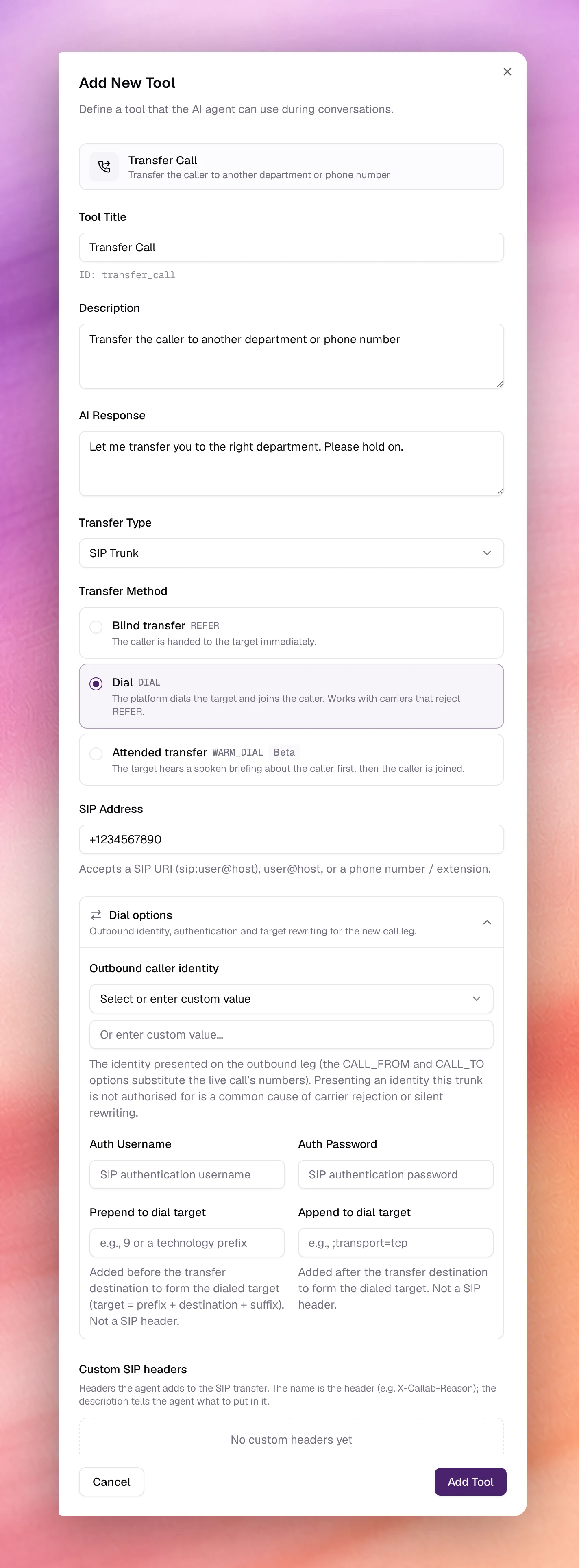
**Custom SIP headers** let the agent pass context to the PBX or the person taking
the call, with every SIP transfer method. The platform always sends `X-AI-OBJECT`
and `X-AI-CONNECTION-DURATION`. Choose **Add header** for each of your own; a row
has these fields:
| Field | Meaning |
|---|---|
| **Header name** | Required. Letters, digits and hyphens only, for example `X-Callab-Reason`. If 2 rows share a name, only one is sent. |
| **Fixed value** or **Model chooses** | Where the value comes from. Pick one per header. |
| **Value** | With **Fixed value**: sent as is. It can contain `{{CALL_FROM}}` and `{{CALL_TO}}`, for example `sales-line`. |
| **Choices** | With **Model chooses**: the values the agent picks from, for example `billing`, `support`, `sales`. Type one and press Enter or a comma to add it. |
| **What the model is told** | What the agent should put in the header, for example `Why the caller wants a person`. |
Once a row has a name and a value or choices, a preview of the header shows under
it.
### Ziwo
| Field | Type | Notes |
|---|---|---|
| **Ziwo Queue/Extension** | Text | The Ziwo queue name or extension number to transfer to. |
Choose **Add Tool**, then **Save** the agent.
## Behaviour and limits
- The agent says **AI Response**, then the transfer is attempted. On success the
agent leaves the call; the call's page records the transfer as a tool call.
- A **Transfer Type** that does not match the number the call is on fails. Check
the number's type under **Phone Numbers** before choosing.
- Browser test calls have no carrier behind them, so a transfer cannot complete
there. Test transfers on a real number.
- Flow agents get the same targets from a **Transfer call** node, without the
method, dial options and header options. Use this tool as a global or node tool
when you need those. See [Nodes](/build/flow-agents/nodes#transfer-call).
- One tool, one destination. For several departments, add several tools with
distinct names and descriptions.
## Troubleshooting
- **The agent says the transfer line but the call stays with it.** The target is
unreachable or the type is wrong. Verify the SIP address or number from a phone,
and match **Transfer Type** to the number.
- **The form rejects the SIP Address.** It must be a `sip:` or `sips:` URI,
`user@host`, or a number or extension; a name such as `front desk` cannot be
routed.
- **The carrier or PBX rejects the transfer.** Switch **Transfer Method** to
**Dial**, then under **Dial options** fill **Auth Username** and **Auth
Password**, or set the prefix the PBX expects in **Prepend to dial target**.
- **The agent transfers everyone.** The **Description** is too broad. State the
condition: `Only when the caller explicitly asks for a person`.
## Related
- [Tools overview](/build/tools/overview)
- [SIP trunk](/deploy/phone-numbers/sip-trunk)
- [BYOT (Twilio)](/deploy/phone-numbers/byot-twilio)
- [Guardrails](/build/prompting/guardrails)
- [Nodes](/build/flow-agents/nodes)