---
title: Choosing a voice
description: "Pick the voice a voice agent speaks with: the voice picker, its filters and previews, and how the language limits the list."
---
Voice agents
A voice agent speaks with one voice, chosen in the **General** card of
**Settings**. The picker offers the voices that fit the agent's language and model,
each with a preview, and can be changed at any time.
:::note[Language first]
The voice list is filtered by the agent's **Language**. Set the language, then pick
the voice. When no voice matches the language, the picker falls back to
**Multilingual** voices; when there are none either, it shows **No voices available
for selected language** and is disabled. An agent with several languages only sees
voices that speak all of them.
:::
## Configuring it
1. Open the agent on **Settings**.
2. In **General**, open the voice selector under **Language**. It shows the current
voice with its flag, locale and gender, for example **Adam Stone**, `en-GB`,
male.
3. Narrow the list: type in **Search by name, language, accent, or label**, or use
the **Gender** buttons (**Female**, **Male**) and, when the list holds more than
one locale, the **Language** buttons.
4. Choose **Play preview** on a voice to hear it.
5. Click the voice to select it, then **Save**.
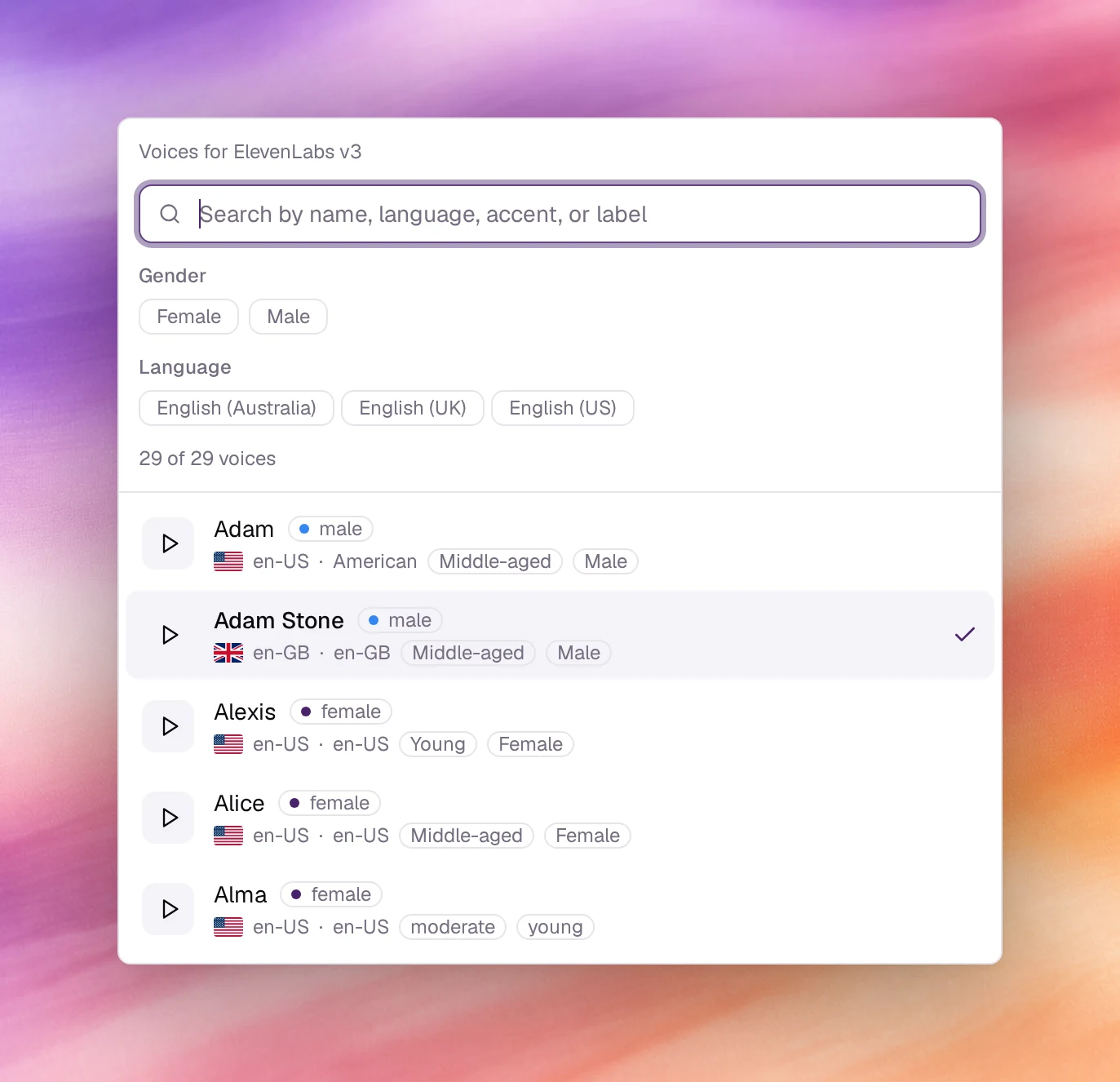
*Filtering to English (UK), previewing and picking a voice.*
## Reading a voice entry
Each entry shows the name, the gender, a flag, the locale (`en-US`, `fr-FR`,
`ar-SA`), an accent or label (**American**, **Australian**), **Multilingual** where
the voice can speak other languages, and an age label such as **Young**,
**Middle-aged** or **Old**. The counter reads how many of the offered voices match
the filters, for example **12 of 12 voices** before any filter is applied.
A few voices have no preview and their **Play preview** button is disabled. They
can still be selected; test them with **Call**.
## Voices and the model
The voice agent's text-to-speech model, set under **Model controls** in the header
of **General** (see [LLM configuration](/build/llm-configuration)), decides which
voices can be produced. The picker only offers those, and names the model at the
top: **Voices for** followed by the model's name. If a model change leaves the
selected voice unusable, it is switched for one the model can speak and a note under
the picker names both; changing the model back restores it. A voice the model cannot
produce is flagged **The selected voice is not available on this model**.
**Voice settings**, the button beside the picker, holds the fine controls the
current model exposes for the voice. They differ from model to model; **Reset to
defaults** restores them, and a model with none shows **No tunable settings for
this model**.
## Choosing well
- **Match the locale to the callers.** A `en-GB` voice on a US line sounds foreign
to callers even when the words are right.
- **Multilingual voices** keep their identity when the agent switches language mid
call. Prefer them for lines that serve more than one language.
- **Test in Call, not only Preview.** The preview is a studio sample; the call test
runs the voice through the same pipeline as a real call.
- **Age and pace are part of the brand.** Play three candidates to the people who
own the phone line before settling.
## Behaviour and limits
- One voice per agent. Two voices means two agents.
- Changing the voice is a saved change: a new version, with rollback.
- The voice speaks the **First message** and every reply; it does not affect
transcription, which follows **Language**.
- Background audio is separate; see [Background audio](/build/voice-and-audio/background-audio).
## Verify
Open **Call** under **Testing** and start a call. The first message is spoken in
the new voice.
## Troubleshooting
- **The picker is disabled.** No voice exists for the selected **Language**. Pick a
language from the list on [Languages](/build/voice-and-audio/languages).
- **The voice I want is missing.** The current text-to-speech model cannot produce
it. Change the model under **Model controls**.
- **The preview does not play.** The voice has no sample. Use the call test.
## Related
- [Languages](/build/voice-and-audio/languages)
- [Background audio](/build/voice-and-audio/background-audio)
- [First message and conversation](/build/prompting/first-message-and-conversation)
- [Testing in the browser](/test-and-improve/testing-in-the-browser)