---
title: Create an outbound campaign
description: "Run a batch call: a voice agent calls a filtered list of contacts from one of your numbers. Name it, set the calling window and retries, pick the audience."
---
Voice agents
An outbound campaign dials contacts one after another, inside a calling window,
and hands each answered call to the agent. It is created under **Launch AI
Voice** in a wizard of 3 steps, with one more when the agent declares dynamic
variables and another when you pick a post-call flow, and then runs on its own
until the list is exhausted or you stop it.
:::note[Before you start]
You need a published voice agent, a [phone number](/deploy/phone-numbers/overview)
and [contacts](/deploy/contacts) that share a **Source** or **Tag**. If the agent's
prompt uses [dynamic variables](/build/dynamic-variables), give the contacts
metadata fields with the same names.
:::
## Create it
1. **Choose the type**
In the sidebar choose **Launch AI Voice**, then **Create Campaign**. In
**Select Campaign Type** choose **Outbound**, described as *Make calls from
your AI agent*.
2. **Campaign info**
Type a **Campaign Name** of at least 3 characters. Pick the **AI Agent**
(the list shows the workspace's voice agents, most recently updated first)
and the **Outbound Phone Number** the calls come from. **Agent version** follows
the agent's latest version unless you pin the campaign to a specific one; an
agent with nothing published shows **Publish the agent** and *This agent has
no published version yet. Publish it to pin a version.* Leave **Post-call flow** on
**No flow** unless you have built an automation to receive results; picking
one adds a mapping step at the end. **Next**.
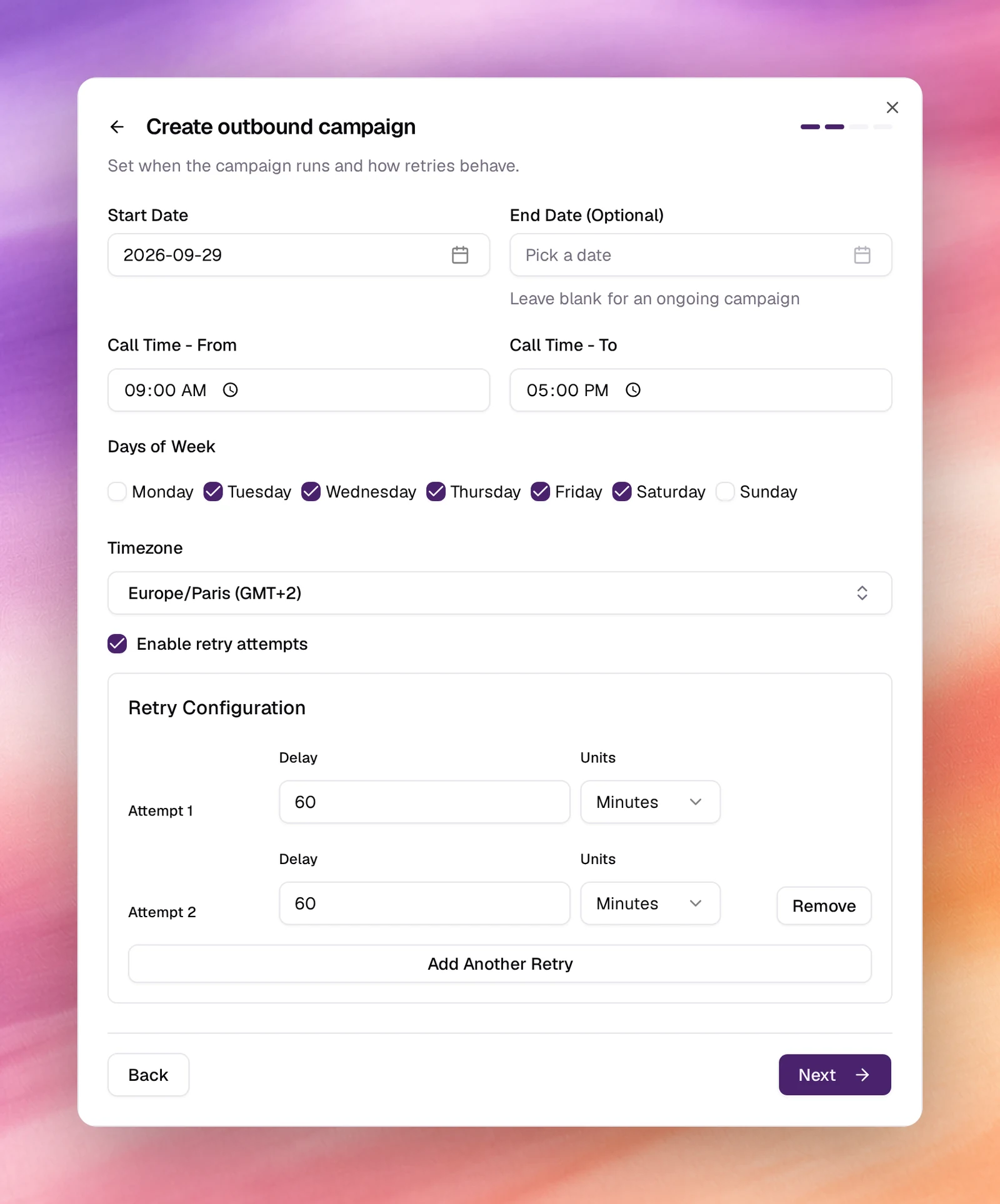
3. **Schedule and retries**
**Start Date** defaults to today; leave **End Date** blank for an ongoing
campaign. Set **Call Time - From** and **To**, tick the **Days of Week**, and
choose the **Timezone** the window is expressed in. Tick **Enable retry
attempts** to call back numbers that did not answer. The options are
explained in [Calling windows and retries](/deploy/campaigns/calling-windows-and-retries).
**Next**.
4. **Audience**
Choose at least one value in **Contact Sources** and **Contact Tags**;
**Contact Categories** is optional. Each picker is a multi-select with
**(Select All)**. A contact is called when it matches a selected source and a
selected tag, and a selected category if any. See
[Audience, tags and categories](/deploy/campaigns/audience-tags-and-categories).
The button below is **Launch your AI**, or **Next** when a variables or
flow step follows.
5. **Agent variables (agents with dynamic variables only)**
**Agent Dynamic Variable Mapping** lists each variable the agent's prompt
uses. For each one pick a **Data Source** (a contact field such as
**Firstname** or **Metadata**) or **Use custom input** for a fixed value.
6. **Flow mapping (with a post-call flow only)**
The chosen flow is shown with **Change**. **Webhook Variable Mapping** lists
the variables the flow expects; map each to a data source. **Test Flow**
sends a test run.
7. **Launch**
Choose **Launch your AI**. The campaign appears in the list as a card with
its status, agent, number, schedule and audience. A start date in the future
lists it as **Scheduled**.
*The outbound campaign wizard, from Create Campaign to the audience step.*
## What the agent knows about each contact
The agent is told the contact's name and number, and any metadata field whose
name matches a dynamic variable in the prompt is filled in for that call. To
check or change the mapping after creation, pause the campaign and open its
**Settings** page: the **Agent variables** section, **Agent Dynamic Variable
Mapping**, lists each variable the agent declares and the data source it takes.
An agent with no variables shows *The selected AI Agent has no dynamic variables
defined*.
The **Settings** page also has a **Webhook** section to forward every call's
outcome to an integration or custom flow from [Automations](/operate/automations).
## Verify
- The card under **Launch AI Voice** shows the right agent, number, schedule
and tag count. **View Details** opens the campaign's page.
- Inside the calling window, **Total Calls** on the page starts to climb and
**Call Logs** on the campaign fills with rows. Open one to read the transcript.
- The campaign's **Status** filter and tiles (**Running Campaigns**,
**Scheduled Campaigns**, **Completed Campaigns**) reflect where it is.
## Troubleshooting
- **Outbound is greyed out in Select Campaign Type.** No phone number is free
for an outbound campaign; the card says why and offers **Add a phone number**.
- **Next stays disabled on the first step.** The name needs at least 3
characters, and an agent and a number must be picked.
- **Launch your AI stays disabled.** Both **Contact Sources** and **Contact
Tags** need at least one value.
- **The campaign is scheduled but nothing dials.** You are outside **Call Time**
or **Days of Week** in the chosen **Timezone**. The campaign's page shows the
window converted to your local time.
- **Calls go out slower than expected.** The trunk's **Concurrency Limit** caps
simultaneous calls. See [SIP trunk](/deploy/phone-numbers/sip-trunk).
- **Variables are empty on the call.** The contact metadata field name and the
prompt's variable name differ. Names are exact; check the **Agent variables**
section in **Settings**.
## Related
- [Calling windows and retries](/deploy/campaigns/calling-windows-and-retries)
- [Audience, tags and categories](/deploy/campaigns/audience-tags-and-categories)
- [Campaign details](/deploy/campaigns/campaign-details)
- [Contacts](/deploy/contacts)
- [Answering machine detection](/build/speech-pipeline/answering-machine-detection)