---
title: Call details
description: "One call end to end: recording, transcript with timings and tool calls, three quality scores, an AI summary, the outcome and who took part."
---
Voice agents
Open any row in [Call Logs](/operate/call-logs) to reach the call's page at
`/call-details/`. It is the place to check what happened on one call before
changing a prompt, a tool or a guardrail.
## Header
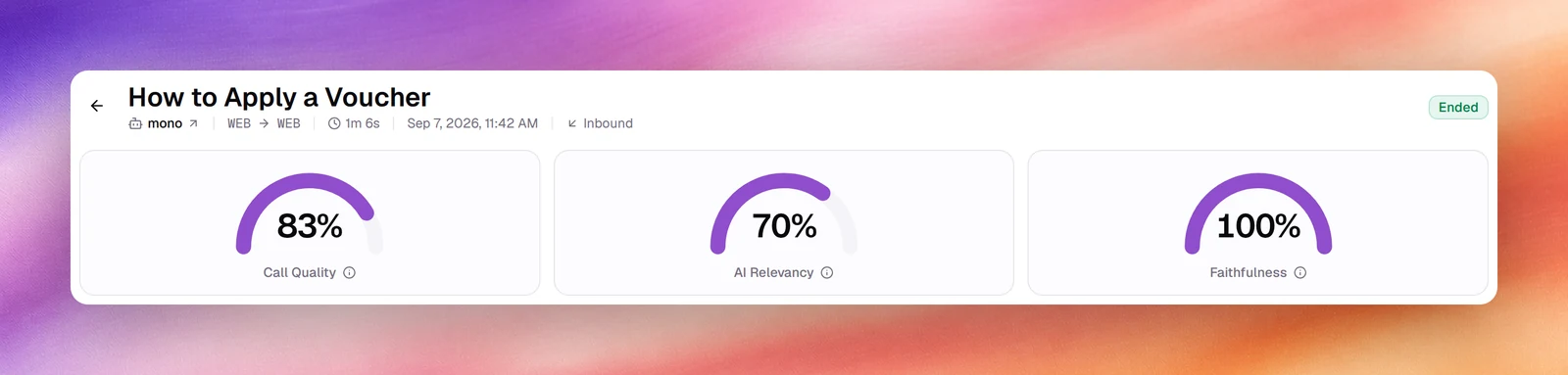
The title is a short subject generated from the conversation, for example
**How to Apply a Voucher**; before one exists it is the contact's name or the
dialled number. Under it: the agent's name (a link that opens the agent in a new
tab), the **From** and **To** numbers, the duration, the start time, the direction,
and a **Test call** badge for test calls. The status badge (**Ended**, for example)
sits on the right. The back arrow returns to the list.
While a call is still in progress the badge reads **LIVE** and the page refreshes
itself every 2 seconds, so the transcript fills in as the call goes.
## Quality scores
Three gauges follow the header: **Call Quality**, **AI Relevancy** and
**Faithfulness**, each as a percentage, or a dash when there is no score. Hover the
info icon for the definition. What each one measures, and why Faithfulness is often
empty, is on [Call quality metrics](/operate/call-quality-metrics).
## Recording
The player sits above the transcript, with **Play**, a waveform scrubber and the
elapsed and total time. The download icon (**Download**) saves the recording as a
`.wav` file; the copy icon (**Copy transcript**) puts the whole transcript on the
clipboard. Without a recording the bar reads **No recording.**, or **Recording
will be available when the call ends.** during a live call; the copy icon stays.
:::note
A recording exists only if the agent's data retention setting keeps audio. See
[Data retention](/build/privacy/data-retention).
:::
## Packet capture (PCAP)
For calls placed over a SIP trunk, **Download PCAP** saves a network capture of the
call, for opening in a tool such as Wireshark. It is the
file your carrier will ask for when a call connects badly, drops, or has one-way
audio. **PCAP Downloaded** confirms it; **Download Failed** means the capture could
not be fetched.
Browser test calls do not go through a SIP trunk, so they have no capture.
## Transcript
The transcript is a chat: the caller on the right, the agent on the left. Each turn
carries its offset from the start of the call (`00:15`) and, on the caller's turns,
the time the agent took to answer (`3.1s`). When the agent used a tool, a
one-line row sits between the turns: a short description such as **Ended the call**,
or **Used <tool>** for other tools, followed by its main argument, for example
**Used search_knowledge_base** and the query it sent to the knowledge base. Choose
the row to expand its **Parameters** and **Result**.
On a flow agent, each turn also names its node, and a divider marks each move from
one node to the next. A mid-call hand-off to another agent shows as an **Agent
handoff** divider.
Response times are the single best signal for a slow agent. A steady 3 seconds or
more usually means a long prompt, a slow tool or a model choice worth revisiting in
[LLM configuration](/build/llm-configuration).
## Summary, quality assessment and outcome
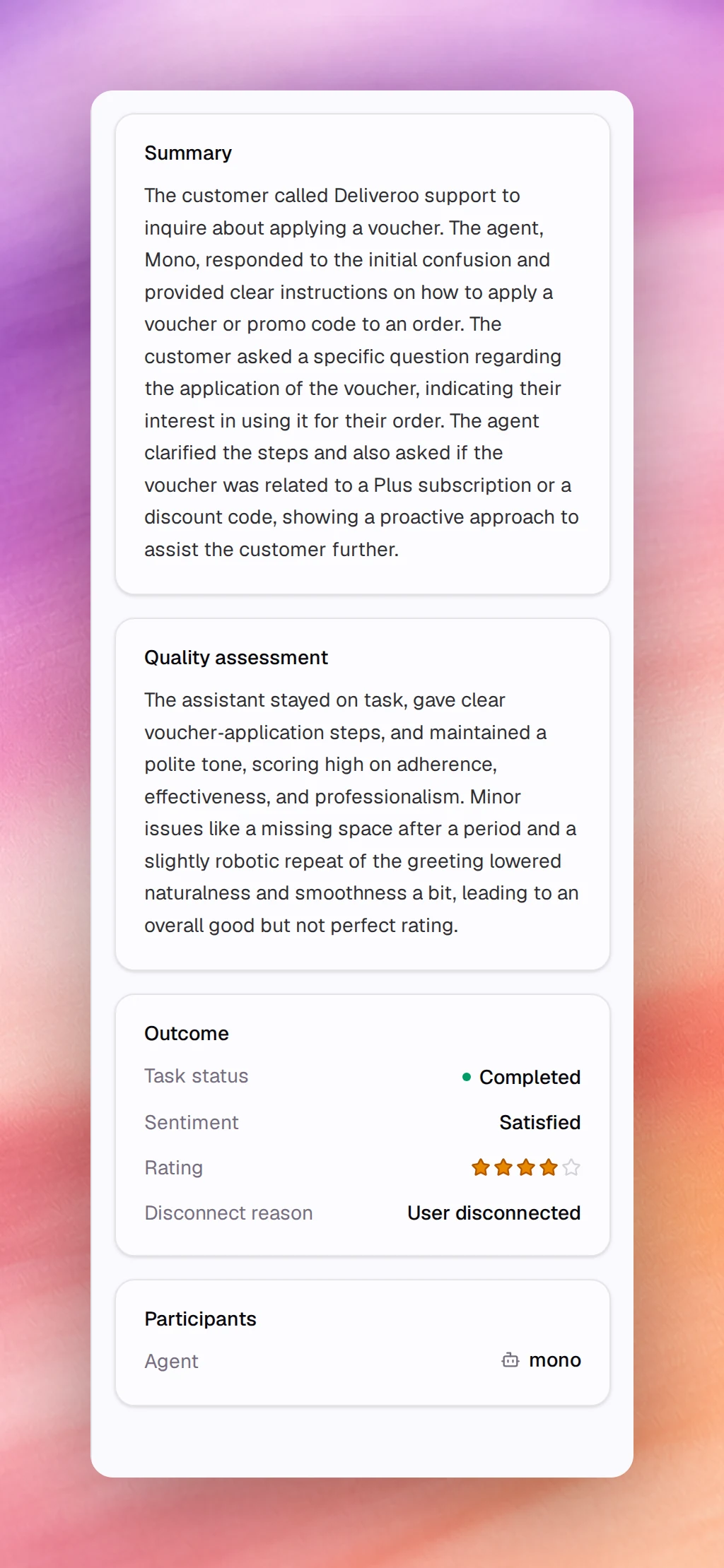
The right column, shown on wide screens, holds cards produced after the call ends.
A card with nothing to show is left out.
- **Summary**: a paragraph on what the caller wanted and what the agent did.
- **Quality assessment**: a paragraph explaining the **Call Quality** score, naming
what scored well and what pulled it down. It appears only when the scoring
produced an explanation.
- **Outcome**: **Task status** (for example **Completed**), **Sentiment** (for
example **Satisfied**), **Rating** when one was captured, and **Disconnect reason**
(for example **User disconnected**).
- **Redacted PII**: the kinds of personal data removed from the transcript, with a
count for each, when any was redacted.
- **Captured outcomes**: the custom outcomes you defined under
[Outcomes](/build/outcomes), with the values the agent extracted. A value the
agent did not capture shows a dash.
## Participants
**Participants** links the **Agent** that handled the call to its settings, and,
when the call has them, the **Contact** and the **Campaign**. A **Notes** card
follows when the call carries notes.
## Related
- [Call logs](/operate/call-logs)
- [Call quality metrics](/operate/call-quality-metrics)
- [Outcomes](/build/outcomes)
- [Data retention](/build/privacy/data-retention)