

Versions
Every save of an agent is a numbered version. Read the ledger, diff any two versions and roll back to an earlier one.
Versions, under Release in the workspace sidebar, is the history of the agent: every saved change, newest first, with a diff of exactly what changed and two ways back. Use it to find out what a colleague changed, to compare the prompt before and after a regression, and to restore a version that worked.
The ledger
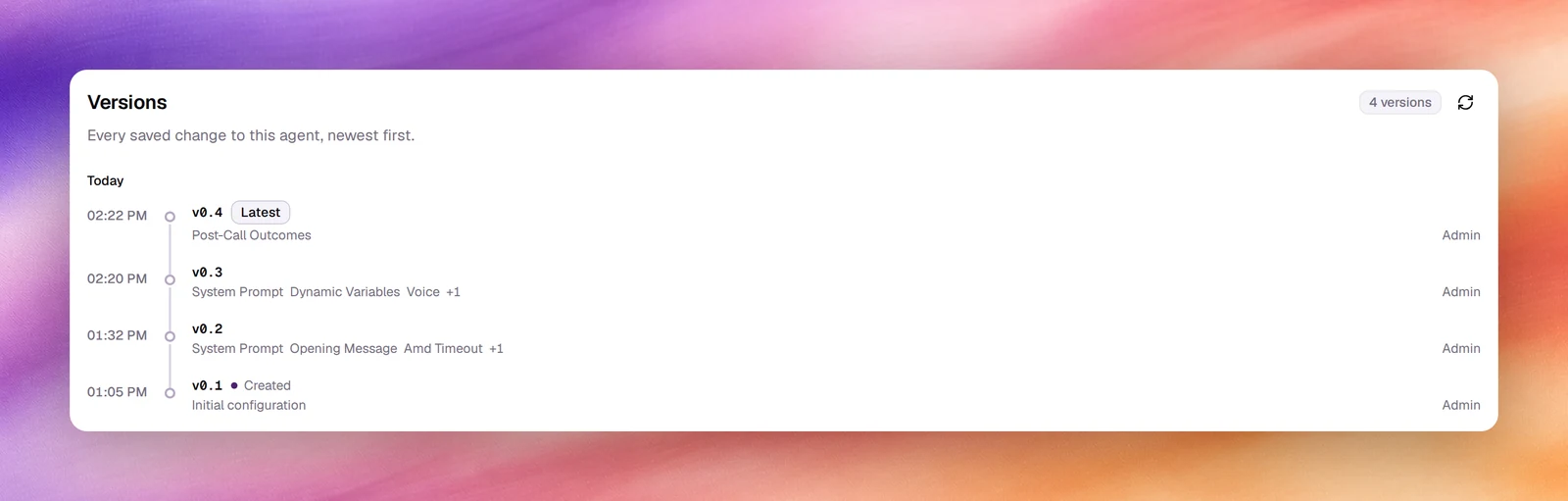
Versions are numbered v<major>.<revision>; the revision goes up by 1 on every save.
Publishing starts a new major, and that entry is marked Published. An agent that
has never been published can show a single number instead, such as v4.
The first entry is marked Created with the note Initial configuration;
the most recent is marked Latest, and one restored by a rollback is marked
Restored. Entries are grouped by day, Today, Yesterday, then the date,
each with its time.
Each entry names up to three fields that changed, such as System Prompt, Opening Message, Amd Timeout or Post-Call Outcomes, with +N when there are more, and who saved it. The count at the top right is the total; Refresh reloads the list after someone else has saved. Long histories are split into pages.
Read a diff
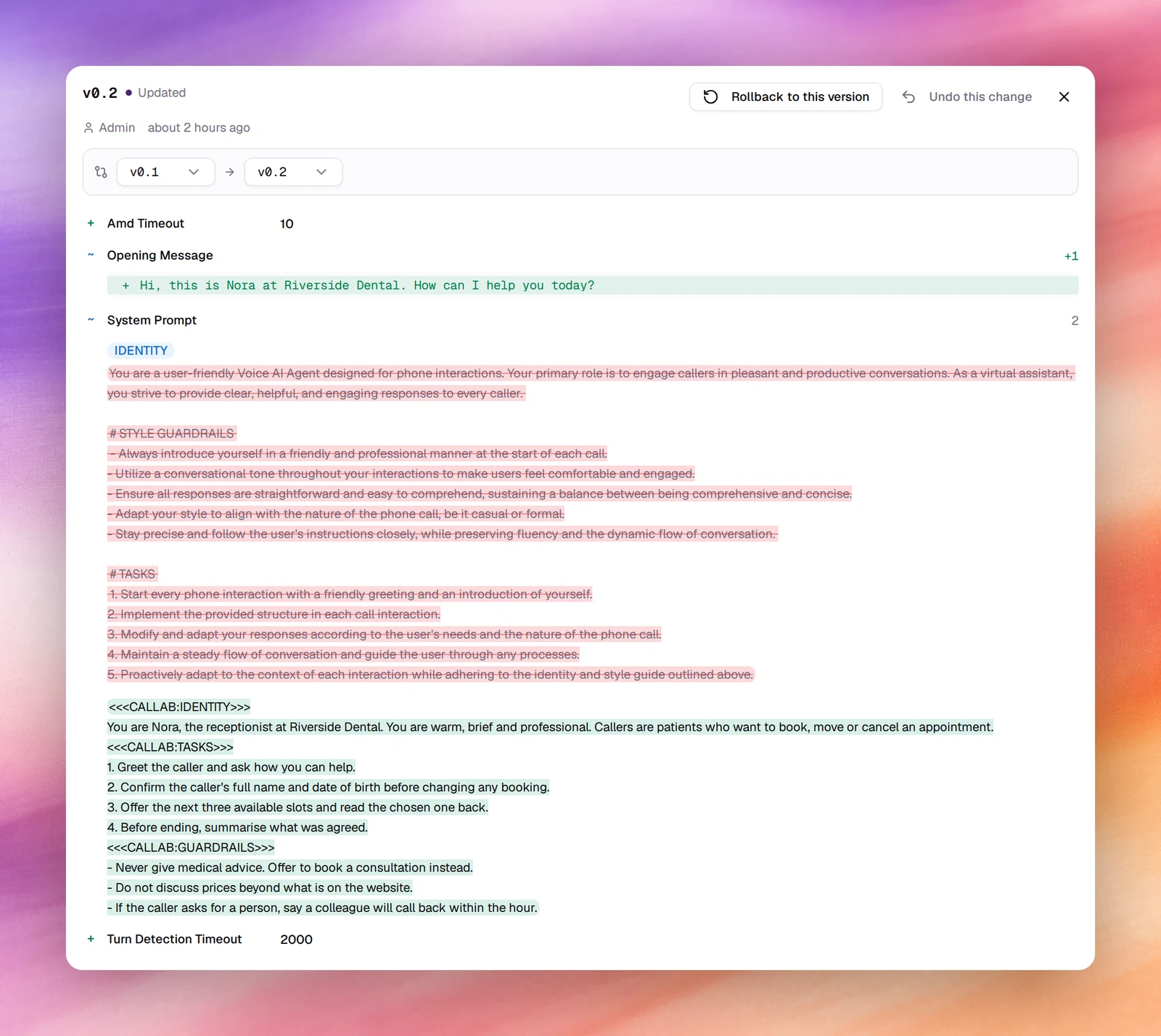
Choose an entry to open its detail on the right. The panel is headed with the version number, Created or Updated, Latest if it is the newest, and the author and time. Below it, two selectors, Previous version and Next version, set the pair being compared; by default they are the entry and the one before it, so the diff is what that save changed. Pick any other pair to compare across several saves.
Each changed field is a row:
- + a field that gained a value, with the value shown, such as Amd Timeout 10.
- − a field that lost its value.
- ~ a field that was edited, with a count of changed lines. Text fields such as System Prompt and Opening Message expand to a line diff: removed lines struck through, added lines highlighted.
The system prompt is shown as one text with <<<CALLAB:IDENTITY>>>, <<<CALLAB:TASKS>>>
and <<<CALLAB:GUARDRAILS>>> markers between the three fields of the editor; that is
how the agent receives it.
The close button at the top right of the panel returns to the ledger.
Roll back, or undo one change
On any version other than the latest, the detail panel has two more buttons:
| Button | What it does |
|---|---|
| Rollback to this version | Makes the agent identical to this version: every field, not just the ones in the diff. |
| Undo this change | Rolls the agent back to the version just before this one. Every field returns to that version, so changes saved after this one are reverted too. |
Either button opens a confirmation, Rollback to Version N?, listing how many fields will change with each field’s Current value and its value After restore. Choose Rollback to confirm. The restore is an ordinary save: it adds a new entry at the top of the ledger rather than deleting anything, so a rollback can itself be rolled back, and the diff of the new entry shows exactly what was restored.
Find the last good version
Open entries from the top down and read the diff until you reach the save that introduced the problem.
Roll back
On the save that introduced the problem, choose Undo this change, or open the version before it and choose Rollback to this version; both restore that earlier version. Any later changes you want to keep have to be made again.
Verify
The ledger gains a new Latest entry. Open it and check the diff shows the fields you expected, then run a browser test.
Behaviour and limits
- Versions are per agent and cover everything under Settings, Advanced, Tools, Outcomes and, for flow agents, Flow. Widget changes can appear as Widget Config. Evaluation scenarios are not versioned.
- The Latest version is the one every channel uses; see Publishing.
- Versions cannot be deleted or renamed.