

Turn detection
How a voice agent decides it is its turn to speak: the Turn detection card under Advanced, its Smart, Strict and None modes, and the turn timeout.
Voice agentsTurn detection decides when the caller has finished and the agent may answer. With it off, the agent answers as soon as voice activity detection hears enough silence. With it on, the agent also weighs what was said: a sentence that trails off with “and my number is” is not a finished turn, however long the pause.
How it works
The speech pipeline runs in this order for every caller turn:
- Noise reduction, if enabled, cleans the audio.
- Voice activity detection finds the start and end of speech.
- Turn detection decides whether that end of speech is the end of the turn.
- The agent answers, or waits for more.
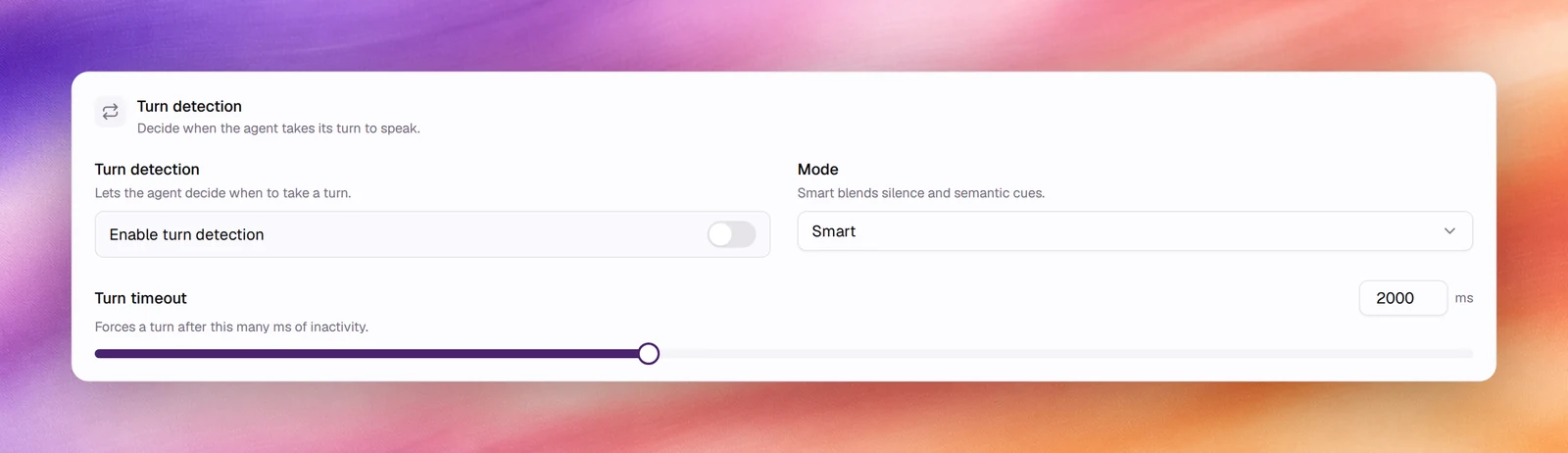
Configuring it
- Open the agent and choose Advanced under Build.
- In Turn detection, switch on Enable turn detection.
- Pick a Mode and set Turn timeout.
- Save.
Reference
| Field | Default | Unit or options | Range | What it does |
|---|---|---|---|---|
| Enable turn detection | Off | On, off | Lets the agent decide when to take a turn | |
| Mode | Smart | Smart, Strict, None | Smart blends silence and semantic cues. Strict waits for a clear end of the turn before answering. None answers on silence alone | |
| Turn timeout | 2000 | ms | 0 to 5000, step 100 | Forces a turn after this many ms of inactivity, whatever the mode decided |
Choosing a mode
- Smart for most lines. It answers quickly on complete sentences and waits on incomplete ones.
- Strict where being talked over is worse than a slow reply: legal notices, medical intake, anything read back for confirmation.
- None where speed matters more than the occasional interruption, or to make the card’s other settings behave exactly like VADVADVoice activity detection. The thresholds that decide what counts as speech and what counts as silence.See the glossary alone.
Turn timeout is the safety net: if the caller stops without a clear end, the agent takes its turn after this delay anyway. 2000 ms suits most calls; go lower for snappy exchanges, higher when callers read long numbers aloud.
Behaviour and limits
- Turn detection cannot make the agent answer faster than VAD’s Min Silence Duration plus End-of-speech timeout allow. Tune those first for latency.
- With the switch off, Mode and Turn timeout have no effect, though their values are kept.
- The setting applies to the Call test as well as phone calls, so it can be tuned from the browser.
Verify
Start a call under Testing, Call, and say a sentence with a pause in the middle: “my postcode is … let me check … SW1A 1AA”. With Smart on, the agent waits through the pause. Compare with the switch off.
Troubleshooting
- The agent interrupts callers. Turn detection on, Smart, and raise VAD’s Min Silence Duration.
- The agent takes too long to answer. Lower Turn timeout, or switch to None and tune VAD instead.